
TagLibs con Cuerpo
Vamos a mostrar en este tutorial como construir TAG que interactuen con su
contenido y que tengan la capacidad de contener otras etiquetas
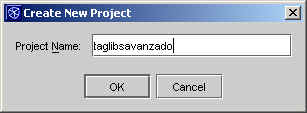
Vamos a utilizar NetBeans. Creamos un nuevo proyectos
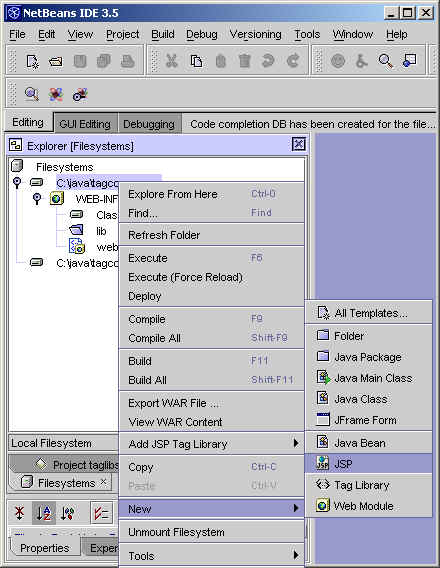
Posteriormente lo convertimos en un WebModule y lo convertimos en un JSP.
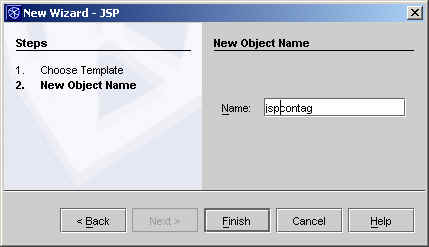
Le asignamos un nombre.
Vamos a crear una nueva etiqueta que sea capaz de repetir una
grupo de cadena de caracteres que tiene dentro… posteriormente ya lo
complicaremos.
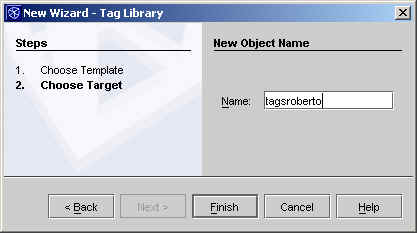
Insertamos la librería de TAGs
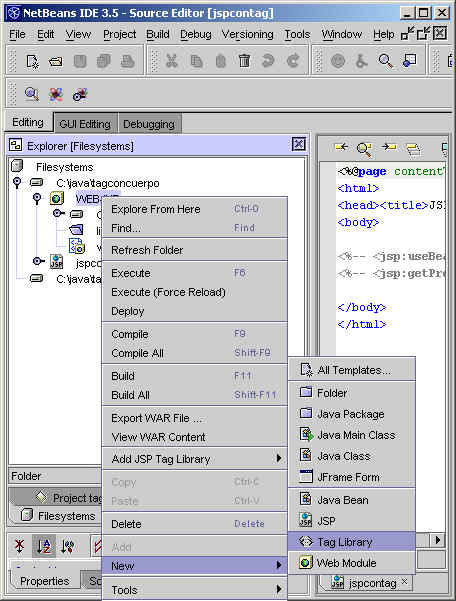
Le asignamos un nombre al grupo
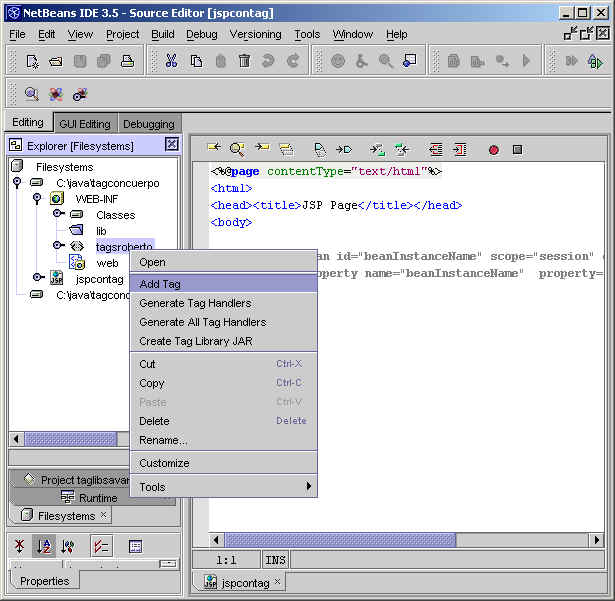
Ahora craremos una nueva etiqueta que vamos a llamar repetir
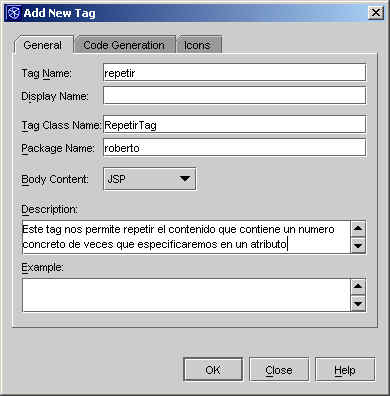
Le asignamos los valores deseados
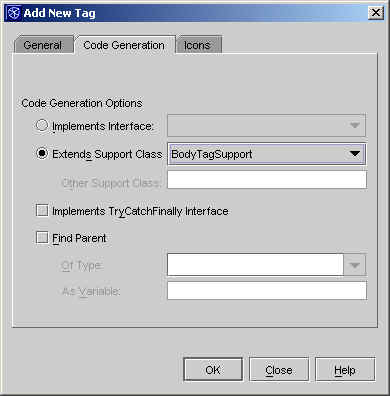
Le decimos que es un tag con cuerpo.
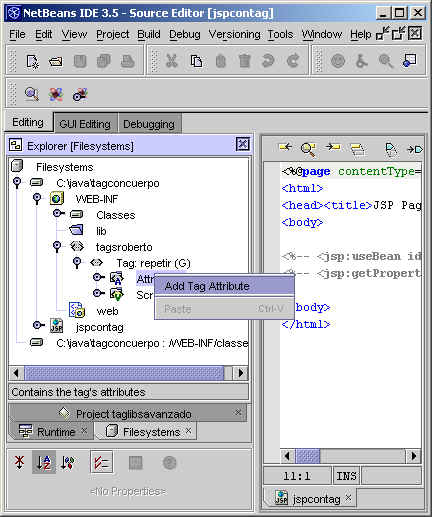
Ahora añadimos un atributo
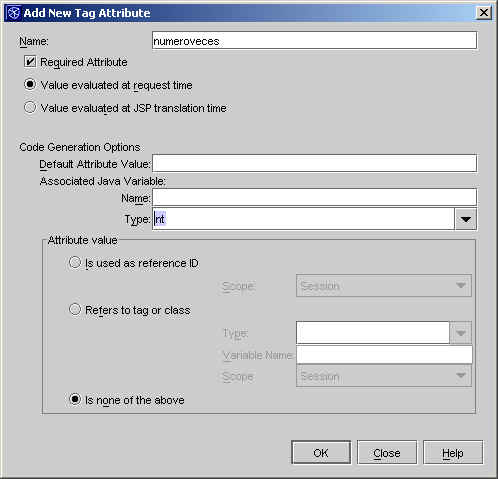
Asignamos un nombre, tipo (int) y lo definimos como obligatorio.
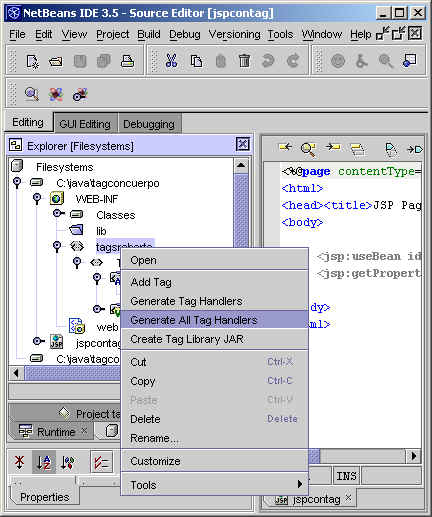
Ahora creamos las clases en base a la especificación
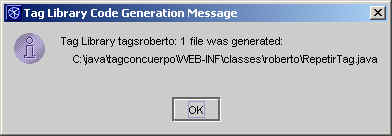
El sistema nos indica que ha creado una nueva clase
El código generado posee unos comentario que debemos leer
atentamente…
package roberto;

import java.io.IOException;
import java.io.PrintWriter;
import javax.servlet.ServletRequest;
import javax.servlet.jsp.JspException;
import javax.servlet.jsp.JspWriter;
import javax.servlet.jsp.PageContext;
import javax.servlet.jsp.tagext.BodyContent;
import javax.servlet.jsp.tagext.BodyTag;
import javax.servlet.jsp.tagext.BodyTagSupport;
import javax.servlet.jsp.tagext.IterationTag;
import javax.servlet.jsp.tagext.Tag;
import javax.servlet.jsp.tagext.TagSupport;

/**
 *  Generated tag class.
 */
public class RepetirTag extends BodyTagSupport {

    /** property declaration for tag attribute: numeroveces.
*
*/
    private int numeroveces;

    public RepetirTag() {
   super();
    }

    ////////////////////////////////////////////////////////////////
    ///   ///
    ///   User methods.  ///
    ///   ///
    ///   Modify these methods to customize your tag handler.    ///
    ///   ///
    ////////////////////////////////////////////////////////////////

//
    // methods called from doStartTag()
    //
    /**
*
* Fill in this method to perform other operations from doStartTag().
*
*/
    public void otherDoStartTagOperations()  {

   //
   // TODO: code that performs other operations in doStartTag
   //  should be placed here.
   //  It will be called after initializing variables,
   //  finding the parent, setting IDREFs, etc, and
   //  before calling theBodyShouldBeEvaluated().
   //
   //  For example, to print something out to the JSP, use the following:
   //
   //   try {
   //  JspWriter out = pageContext.getOut();
   //  out.println("something");
   //   } catch (java.io.IOException ex) {
   //  // do something
   //   }
   //
   //
    }

    /**
*
* Fill in this method to determine if the tag body should be evaluated
* Called from doStartTag().
*
*/
    public boolean theBodyShouldBeEvaluated()  {

   //
   // TODO: code that determines whether the body should be
   //  evaluated should be placed here.
   //  Called from the doStartTag() method.
   //
   return true;
   }


    //
    // methods called from doEndTag()
    //
    /**
*
* Fill in this method to perform other operations from doEndTag().
*
*/
    public void otherDoEndTagOperations()  {

   //
   // TODO: code that performs other operations in doEndTag
   //  should be placed here.
   //  It will be called after initializing variables,
   //  finding the parent, setting IDREFs, etc, and
   //  before calling shouldEvaluateRestOfPageAfterEndTag().
   //
    }

    /**
*
* Fill in this method to determine if the rest of the JSP page
* should be generated after this tag is finished.
* Called from doEndTag().
*
*/
    public boolean shouldEvaluateRestOfPageAfterEndTag()  {

   //
   // TODO: code that determines whether the rest of the page
   //  should be evaluated after the tag is processed
   //  should be placed here.
   //  Called from the doEndTag() method.
   //
   return true;
    }

    ////////////////////////////////////////////////////////////////
    ///   ///
    ///   Tag Handler interface methods.///
    ///   ///
    ///   Do not modify these methods; instead, modify the  ///
    ///   methods that they call.  ///
    ///   ///
    ////////////////////////////////////////////////////////////////


    /** .
*
* This method is called when the JSP engine encounters the start tag,
* after the attributes are processed.
* Scripting variables (if any) have their values set here.
* @return EVAL_BODY_INCLUDE if the JSP engine should evaluate the tag body, otherwise return SKIP_BODY.
* This method is automatically generated. Do not modify this method.
* Instead, modify the methods that this method calls.
*
*
*/
    public int doStartTag() throws JspException, JspException {
   otherDoStartTagOperations();

   if (theBodyShouldBeEvaluated()) {
  return EVAL_BODY_BUFFERED;
   } else {
  return SKIP_BODY;
   }
    }

    /** .
*
*
* This method is called after the JSP engine finished processing the tag.
* @return EVAL_PAGE if the JSP engine should continue evaluating the JSP page, otherwise return SKIP_PAGE.
* This method is automatically generated. Do not modify this method.
* Instead, modify the methods that this method calls.
*
*
*/
    public int doEndTag() throws JspException, JspException {
   otherDoEndTagOperations();

   if (shouldEvaluateRestOfPageAfterEndTag()) {
  return EVAL_PAGE;
   } else {
  return SKIP_PAGE;
   }
    }

    public int getNumeroveces() {
   return numeroveces;
    }

    public void setNumeroveces(int value) {
   numeroveces = value;
    }

    /** .
* Fill in this method to process the body content of the tag.
* You only need to do this if the tag's BodyContent property
* is set to "JSP" or "tagdependent."
* If the tag's bodyContent is set to "empty," then this method
* will not be called.
*
*
*/
    public void writeTagBodyContent(JspWriter out, BodyContent bodyContent) throws IOException {
   //
   // TODO: insert code to write html before writing the body content.
   //  e.g.  out.println("" + getAttribute1() + "");
|
Ahora nuestro trabajo será rellenar el código de distintos métodos para
conseguir nuestro objetivo.
La lógica es sencilla, se procesa el cuerpo de la página
public void writeTagBodyContent(JspWriter out, BodyContent bodyContent) throws IOException {
        bodyContent.writeOut(out);
        numeroveces--;
        bodyContent.clearBody();
    }
public boolean theBodyShouldBeEvaluatedAgain() {

      if (this.numeroveces > 0)
            return true;

        return false;
}
|
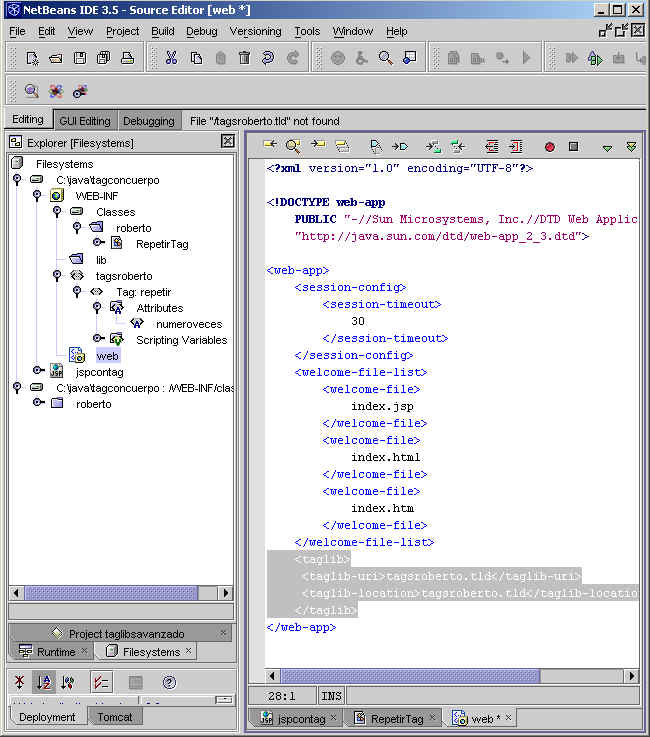
El JSP lo podemos construir con esta forma
| <%@page contentType=»text/html»%> <%@taglib uri=»tagsroberto.tld» prefix=»rc»%> <html> <rc:repetir numeroveces=»4«> </body> |
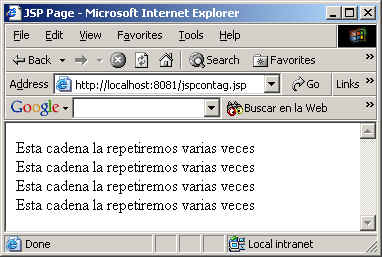
El resultado sería el siguiente
Tag Anidado
Ahora vamos a crear una nueva etiqueta que se intertaría dentro
de la actual, para simplemente mostrar el valor del contador.
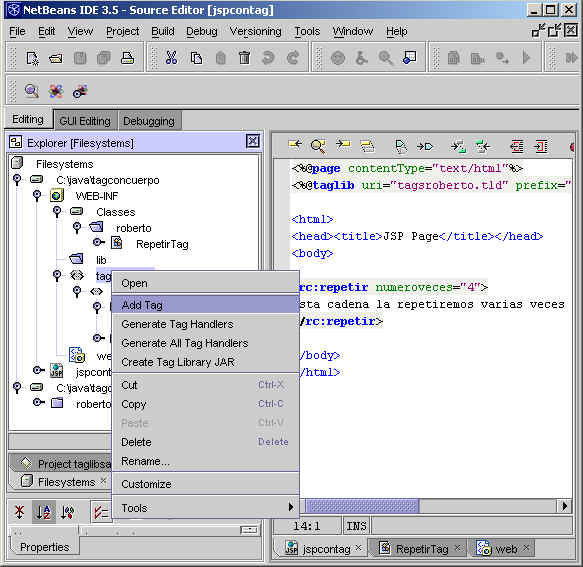
Añadimos un tag simple sin cuerpo
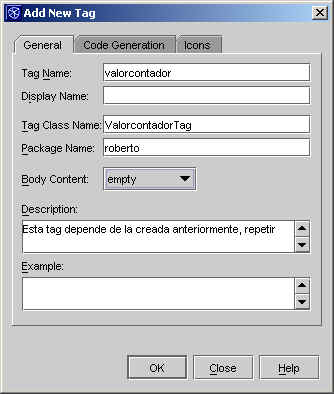
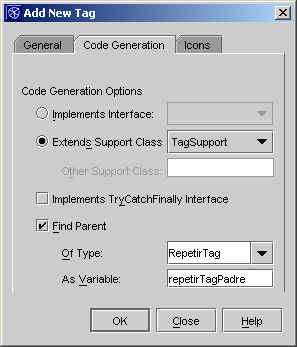
Especificamos que queremos acceder al tag que la contiene ….
en la variable repetirTagPadre
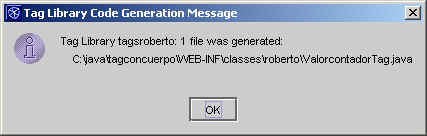
Modificamos el código automáticamente generado
package roberto;

import java.io.IOException;
import java.io.PrintWriter;
import javax.servlet.ServletRequest;
import javax.servlet.jsp.JspException;
import javax.servlet.jsp.JspWriter;
import javax.servlet.jsp.PageContext;
import javax.servlet.jsp.tagext.BodyContent;
import javax.servlet.jsp.tagext.BodyTag;
import javax.servlet.jsp.tagext.BodyTagSupport;
import javax.servlet.jsp.tagext.IterationTag;
import javax.servlet.jsp.tagext.Tag;
import javax.servlet.jsp.tagext.TagSupport;

/**
 *  Generated tag class.
 */
public class ValorcontadorTag extends TagSupport {

    /** This variable contains the parent (enclosing) tag. */
    private RepetirTag repetirTagPadre = null;

    public ValorcontadorTag() {
        super();
    }
    ////////////////////////////////////////////////////////////////
    ///                                                          ///
    ///   User methods.                                          ///
    ///                                                          ///
    ///   Modify these methods to customize your tag handler.    ///
    ///                                                          ///
    ////////////////////////////////////////////////////////////////
    //
    // methods called from doStartTag()
    //
    /**
     *
     * Fill in this method to perform other operations from doStartTag().
     *
     */
    public void otherDoStartTagOperations()  {

        //
        // TODO: code that performs other operations in doStartTag
        //       should be placed here.
        //       It will be called after initializing variables,
        //       finding the parent, setting IDREFs, etc, and
        //       before calling theBodyShouldBeEvaluated().
        //
        //       For example, to print something out to the JSP, use the following:
        //

        try {
               JspWriter out = pageContext.getOut();

                if(repetirTagPadre != null)
                {
                    out.println("" + repetirTagPadre.getNumeroveces());
                }
        } catch (java.io.IOException ex) {
               // do something
           }
    }

    /**
     *
     * Fill in this method to determine if the tag body should be evaluated
     * Called from doStartTag().
     *
     */
    public boolean theBodyShouldBeEvaluated()  {

        //
        // TODO: code that determines whether the body should be
        //       evaluated should be placed here.
        //       Called from the doStartTag() method.
        //
        return true;

    }

     //
    // methods called from doEndTag()
    //
    /**
     *
     * Fill in this method to perform other operations from doEndTag().
     *
     */
    public void otherDoEndTagOperations()  {

        //
        // TODO: code that performs other operations in doEndTag
        //       should be placed here.
        //       It will be called after initializing variables,
        //       finding the parent, setting IDREFs, etc, and
        //       before calling shouldEvaluateRestOfPageAfterEndTag().
        //
     }

    /**
     *
     * Fill in this method to determine if the rest of the JSP page
     * should be generated after this tag is finished.
     * Called from doEndTag().
     *
     */
    public boolean shouldEvaluateRestOfPageAfterEndTag()  {

        //
        // TODO: code that determines whether the rest of the page
        //       should be evaluated after the tag is processed
        //       should be placed here.
        //       Called from the doEndTag() method.
        //
        return true;

    }

    ////////////////////////////////////////////////////////////////
    ///                                                          ///
    ///   Tag Handler interface methods.                         ///
    ///                                                          ///
    ///   Do not modify these methods; instead, modify the       ///
    ///   methods that they call.                                ///
    ///                                                          ///
    ////////////////////////////////////////////////////////////////


    /** .
     *
     * This method is called when the JSP engine encounters the start tag,
     * after the attributes are processed.
     * Scripting variables (if any) have their values set here.
     * @return EVAL_BODY_INCLUDE if the JSP engine should evaluate the tag body, otherwise return SKIP_BODY.
     * This method is automatically generated. Do not modify this method.
     * Instead, modify the methods that this method calls.
     *
     *
     */
    public int doStartTag() throws JspException, JspException {
        //
        // Then we find the parent (enclosing tag)
        //
        if (repetirTagPadre == null) {
            repetirTagPadre = (RepetirTag)findAncestorWithClass(this, RepetirTag.class);
        }

        otherDoStartTagOperations();

        if (theBodyShouldBeEvaluated()) {
            return EVAL_BODY_INCLUDE;
        } else {
            return SKIP_BODY;
        }
    }

    /** .
     *
     *
     * This method is called after the JSP engine finished processing the tag.
     * @return EVAL_PAGE if the JSP engine should continue evaluating the JSP page, otherwise return SKIP_PAGE.
     * This method is automatically generated. Do not modify this method.
     * Instead, modify the methods that this method calls.
     *
     *
     */
    public int doEndTag() throws JspException, JspException {
        otherDoEndTagOperations();

        if (shouldEvaluateRestOfPageAfterEndTag()) {
            return EVAL_PAGE;
        } else {
            return SKIP_PAGE;
        }
    }
}
|
Modificamos nuestro JSP
| <%@page contentType=»text/html»%> <%@taglib uri=»tagsroberto.tld» prefix=»rc»%> <html> <rc:repetir numeroveces=»4″> </body> |
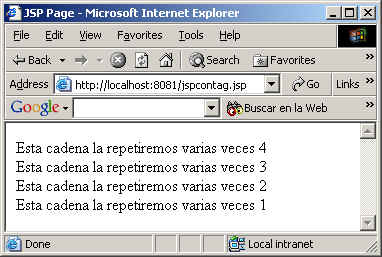
Vemos el resultado…. en este caso… el valor decrementa por
la lógica que le hemos dado.
La verdad es que los Wizards que tienen ahora la herramientas
son un pasada ….. pero procurad no abusar de ellos … porque después …
cuando se cambia de proyecto ….. y se usa otra herramienta …. podemos
parecer patosos..
Podéis descargaos todoel código aquí.

